Download Florante at Laura Font


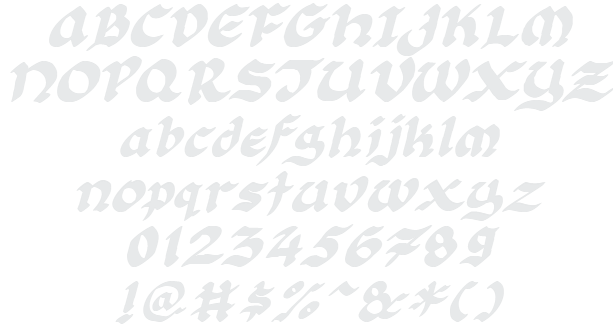
Florante at Laura Example

Download Florante at Laura - 30.271 downloads

Designed by Nyek! Pinoy
Script or Brush Stylish Medieval Magic Slanted Florante at Laura Example Florante at Laura Character Map

Create a Logo Using Florante at Laura

3D Outline Gradient Logo Style
Chick Flick Logo Style
Galactica Logo Style
Sushi Logo Style
Neon Logo Style
Frosty Logo Style
Happy Joy Logo Style
Tesla Logo Style
Robot Logo Style
Gold Trim Logo Style
Water Logo Style
Plain Logo Style
Dragon Logo Style
TROY Logo Style
Glitter Logo Style
House Arryn Logo Style
Starburst Logo Style
Supernova Logo Style
Flaming Logo Style
3D Outline Textured Logo Style
Sugar Logo Style
Felt Logo Style
Legal Logo Style
Scavenge Logo Style
Studio 54 Logo Style
Achilles Logo Style
Royal Logo Style
Ice Cube Logo Style
Bad Acid Logo Style
Lasers Logo Style
Black Gold Logo Style
Keen Logo Style
Skate Logo Style
Liquid Gold Logo Style
Alien Glow Logo Style
Iceberg Logo Style
Particle Logo Style
Halloween Logo Style
OZONE Logo Style
Grinch Logo Style
Neon Glow Logo Style
Gelatin Logo Style
Fantasy Logo Style
Vampire Logo Style
Candy Stripe Logo Style
Trogdor Logo Style
Dark Magic Logo Style
Rage Logo Style
Spring Logo Style
Glowing Steel Logo Style
Chromium Logo Style
Romance Logo Style
Gold Bar Logo Style
GOLD BEVEL Logo Style
PURPLE GIRL Logo Style
Pixel Badge Logo Style
Fire Logo Style
Astroman Logo Style
Conan Logo Style
White Logo Style
Animated Glow Logo Style
Glossy Logo Style
Epic Stone Logo Style
Easy Logo Style
Sword Logo Style

Florante at Laura Example

Florante at Laura Example

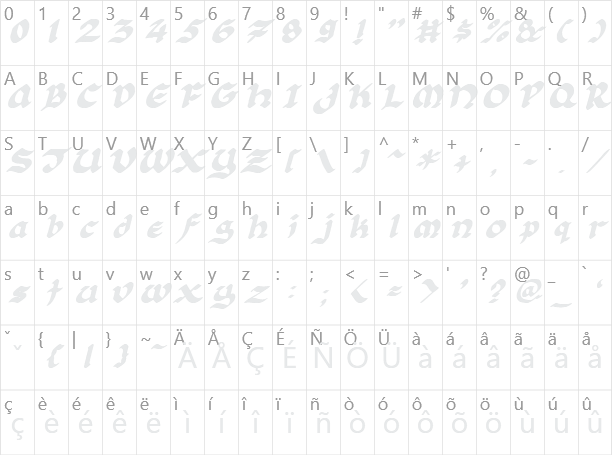
Florante at Laura Character Map

Florante at Laura Character Map

Added on lunes, 8 de agosto de 2011
30.271 downloads
Designed by Nyek! Pinoy

Similar Fonts

Antsy Pants Font Ballpark Font Brush Stroke Font QuigleyWiggly Font Belligerent Madness Font

Font Installation Instructions


You may need to extract the .ttf files from a .zip archive file before installing the font.

Windows (XP/Vista/7/8/10)

Right-click on the .ttf file and select install.

MacOS X (10.3 or later)

Double-click on the .ttf file and select install.


Generator Categories

Most Popular Animated (7) Black (13) Blue (17) Brown (8) Burning (6) Casual (5) Chrome (11) Classic (5) Distressed (22) Elegant (11) Fire (6) Fun (10) Girly (7) Glossy (16) Glowing (20) Gold (19) Gradient (6) Gray (8) Green (12) Heavy (19) Holiday (6) Ice (6) Medieval (12) Metal (8) Neon (5) Orange (10) Outline (31) Pink (14) Purple (15) Red (25) Retro (7) Rounded (22) Science-Fiction (9) Script (5) Shadow (10) Sharp (6) Shiny (9) Space (8) Sparkle (7) Stencil (6) Stone (7) Trippy (5) Valentines (6) White (7) Yellow (15)